

For modern engineering teams and independent developers building platforms like DevHubStack, reliance on third-party cloud workspaces introduces a hidden paradox. While managed SaaS platforms promise absolute simplicity, they frequently bottleneck workflows with hard compute limits, restrictive environment configuration rules, and unpredictable usage-based pricing sheets. Moreover, uploading proprietary repositories into unvetted external infrastructure presents lingering code context compliance concerns.
Therefore, the solution is an intentional architectural shift backward toward autonomy: establishing a remote workspace pipeline that you completely own. In addition, transitioning to custom remote infrastructure allows you to centralize variable computational workloads, build isolated project environments instantly, and code securely from any machine, anywhere in the world.
This technical blueprint cuts through the abstraction to detail exactly how to build a self-hosted development environment from bare metal or private virtual servers, providing full infrastructure autonomy without sacrificing modern engineering convenience.
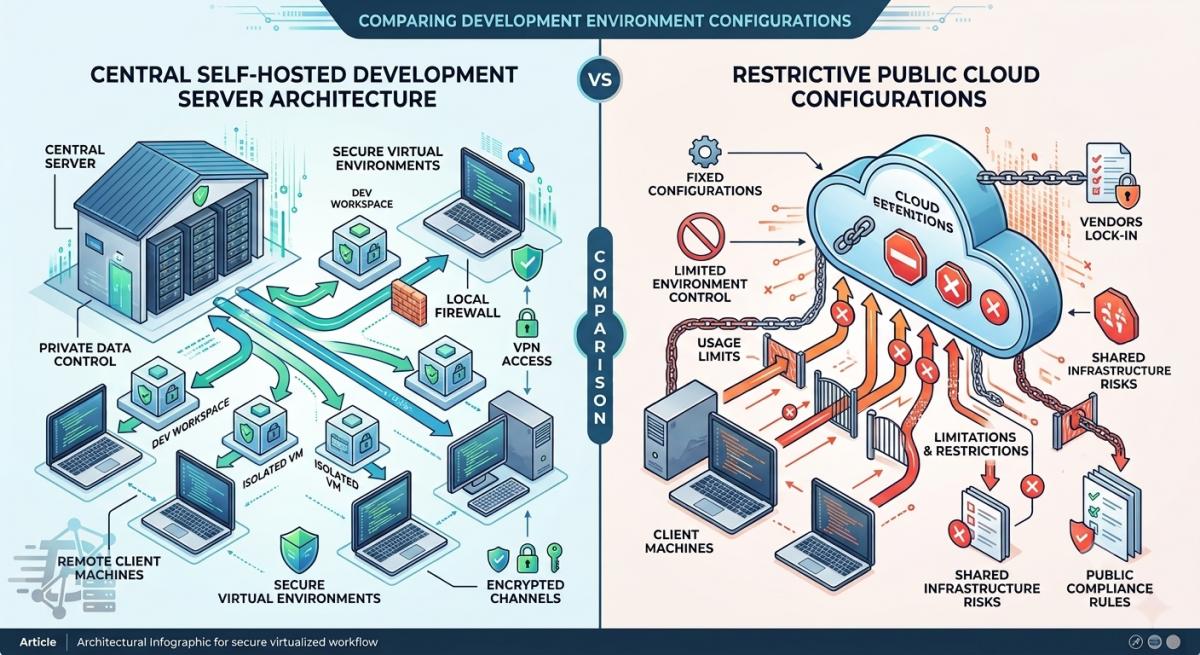
The Architectural Landscape: Managed SaaS vs. Self-Hosted Environments
Before launching server instances, it is critical to evaluate how standard self-hosted configurations stack up against industry-managed giants like GitHub Codespaces. While managed utilities abstract underlying configurations by utilizing temporary virtual containers, they restrict granular operating system access and charge significant markups on computational memory allocations.
On the other hand, by leveraging open-source control planes on your own hardware array or public cloud resources, you decouple your developer workstation from physical client hardware limitations. As a result, this ensures long-running batch compilations or heavy local Docker testing arrays run natively on beefy data machines instead of wearing down laptop batteries.
| Architecture Layer | Managed Cloud SaaS | Self-Hosted Environment Setup | Operational Impact |
|---|---|---|---|
| Compute Governance | Restricted profiles, strict execution timeouts | Complete hardware/VPS root allocation | Run long-lived background workers safely. |
| Data Compliance | Third-party repository hosting platforms | Isolated private network loops | Ensures zero third-party AI scraping risk. |
| Workspace Hydration | Template lifecycle configurations | Native container configurations & dotfiles | Re-create environment dependencies instantly. |
| Cost Scaling | Linear per-developer hourly billing | Flat server hosting infrastructure footprint | Drastically reduces platform spend overhead. |
Choosing the Open-Source Orchestration Core
Building an enterprise-ready workspace requires an open control layer capable of orchestrating infrastructure dynamically. Rather than manually configuring unmapped Virtual Private Servers (VPS) over raw SSH access, modern infrastructure engineering relies on open workspaces that automate code platform generation.
For example, platforms like Coder and self-hosted variants of open-source utilities utilize infrastructure-as-code principles to provision isolated work units using Docker or bare-metal Linux namespaces. This means an engineer can initialize consistent, pre-configured development sandboxes within seconds directly from a unified interface.
Security and Engineering Alert: Exposing web-accessible IDE workspaces straight to the open web without a security layer is an immediate vector for critical network vulnerabilities. Always safeguard backend infrastructure endpoints by enforcing private mesh authentication tunnels before routing any workspace transport layers.
The Roadmap to Deploying Your Self-Hosted Workspace
Follow this technical configuration strategy to provision, containerize, secure, and access your self-hosted remote engineering workstation infrastructure cleanly:
-
1Provision the Base Linux Compute InfrastructureDeploy a high-performance Linux distribution instance (preferably Ubuntu Server LTS or Debian) on your preferred infrastructure vendor or local home-lab hardware array. Additionally, ensure you configure secure cryptographic SSH access rules and lock down standard root login permissions completely.
-
2Install and Configure the Container Runtime EngineInstall the native Docker container service environment onto the server core. This approach isolates individual programming projects from the primary host server file layout, thereby preventing conflicting system dependency overlaps between older and newer applications.
-
3Establish Private Networking with a Secure Mesh VPNInstead of opening public domain routing ports, configure a private overlay network node using tools like Tailscale or standard WireGuard definitions. This configuration ensures that your code engine dashboards and web ports remain strictly unreachable unless a user explicitly authenticates inside your encrypted client mesh layer.
-
4Deploy the IDE Access Interface HubInitialize code-server or a containerized workspace template controller on the machine loop. Finally, point your developer machine desktop client or thin web browser access gateway to the encrypted internal network node address to experience seamless low-latency typing speeds across your dedicated secure remote link.
Reclaiming Engineering Sovereignty
In conclusion, taking the time to construct a self-hosted cloud platform workspace completely reshapes day-to-day software development efficiency. By moving heavy computation tasks away from fragile local laptop environments and isolating operational contexts behind private network mesh tunnels, you lock down structural repository data while drastically scaling hardware boundaries. Ultimately, you own your configuration rules, streamline team tool distribution, and build a highly performant developer engine designed for long-term scalability.