
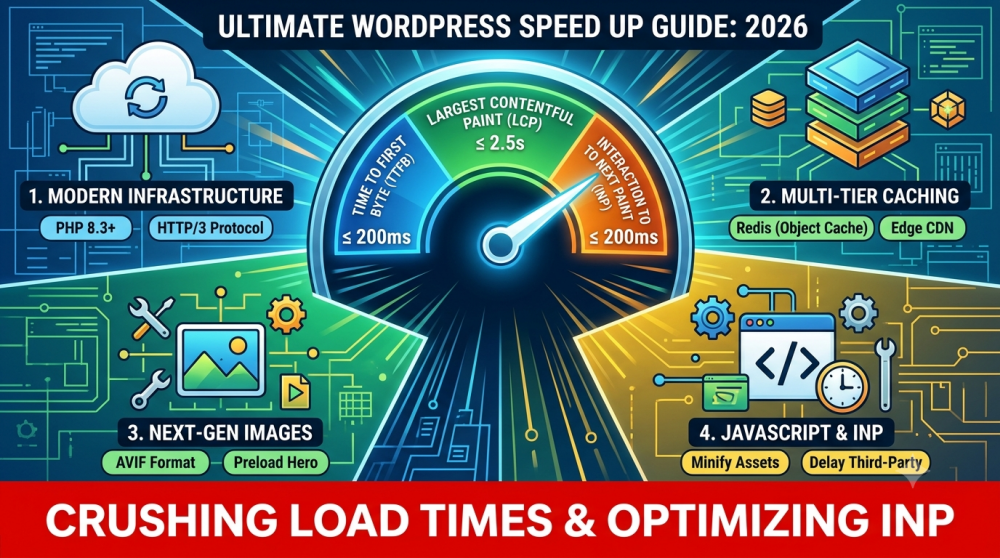
In the current digital landscape, website speed is no longer just a luxury—it is a critical core ranking factor. Under Google’s current page experience signals, search engine crawlers heavily penalize slow-loading sites. If your site takes more than a few seconds to load, you aren’t just losing user conversions; you are actively dropping in global search results.
With the absolute replacement of First Input Delay (FID) by Interaction to Next Paint (INP) as a core metric, performance focus has shifted from how fast a page initially opens to how snappy it feels when a global user actually clicks a button or opens a mobile menu.
If your WordPress site feels sluggish, here is your definitive, expert-backed strategy to achieve lightning-fast loading speeds.

The 2026 Performance Benchmarks
Before optimizing, you must know what numbers you are aiming for. Run your URL through tools like Google PageSpeed Insights or WebPageTest and match your real-world metrics against these industry targets:
| Metric | Target Benchmark | What It Measures | Impact on SEO & Conversions |
|---|---|---|---|
| Time to First Byte (TTFB) | ≤ 200 ms | Server response time. | Speeds up overall indexation and rendering. |
| Largest Contentful Paint (LCP) | ≤ 2.5 seconds | Loading speed of the largest above-the-fold block. | Keeps bounce rates low and improves rankings. |
| Interaction to Next Paint (INP) | ≤ 200 ms | Visual responsiveness to user actions/clicks. | Directly correlates with higher sales and revenue. |
| Cumulative Layout Shift (CLS) | ≤ 0.10 | Visual stability of layout elements. | Prevents accidental clicks and improves user trust. |
1. Upgrade to Modern Infrastructure (The Foundation)
No amount of optimization plugins can save a site stuck on ancient server architecture. If your site is hosted on cheap, overloaded shared hosting plans, your performance has already hit a hard ceiling.
- Move to Container-Based or Managed Hosting: Providers like Kinsta or custom cloud virtual private servers (VPS) managed via systems like RunCloud isolate your resources completely so other traffic spikes don’t tank your system.
- Update to PHP 8.3+: Ensure your server is running the absolute latest stable version of PHP. Running modern PHP executions can speed up backend processing by over 30% compared to outdated variants.
- Enforce HTTP/3 Protocol: Ensure your host utilizes HTTP/3 over UDP. This modern protocol allows multiplexed, faster resource downloads, specifically improving performance on unstable mobile networks worldwide.
2. Implement Multi-Tier Caching
To scale efficiently, your WordPress site must avoid querying the primary database for every single page view. Effective speed optimization requires layered caching.
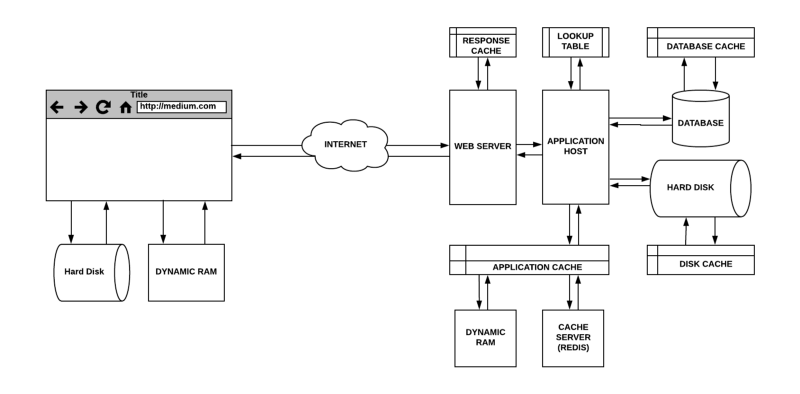
- Page Caching (Server-Level): Utilize Nginx FastCGI caching or LiteSpeed server-level page caching via LiteSpeed Cache to instantly serve pre-built static HTML pages to users.
- Object Caching: Implement a persistent memory database like Redis or Memcached. Object caching saves compiled database query strings, removing the heavy backend drag caused by complex dynamic plugins or e-commerce carts.
- Edge CDNs: Offload your content directly to global networks like Cloudflare or BunnyCDN. Edge caching saves a full copy of your site on servers physically closer to your international visitors, reducing global latency.
3. Solve Image Bloat with Next-Gen Formats
Images make up the vast majority of web page weights. Uploading raw, uncompressed assets will single-handedly break your LCP score.
- Adopt AVIF and WebP Formats: Stop using standard JPEGs or PNGs. The AVIF format offers superior compression ratios compared to WebP, saving up to 50% file weight without visible quality drops. Use plugins like ShortPixel to automate this conversion.
- Explicit Dimensions: Always define
widthandheightproperties within your theme elements or media blocks. This instructs the browser to allocate the correct space ahead of time, preventing sudden jumps and curing CLS errors. - Preload the Hero Image: While you should lazy-load below-the-fold media, you should actively preload your main hero or featured banner image using a high fetch priority (
fetchpriority="high") to fulfill LCP targets instantly.
4. Tackle the JavaScript Challenge (Optimizing INP)
Bloated themes and massive page builders load massive script dependencies on every single page view. To maintain a smooth, responsive score for your global users, optimize how your JavaScript runs.
-
1Minify and Clean AssetsUse optimization tools like WP Rocket or Autoptimize to compress code scripts, clearing away empty spaces and unused structural bloat.
-
2Generate Critical CSSExtract only the CSS rules needed to display the top of the viewport. Inline these into your site head and safely defer everything else.
-
3Defer Non-Essential JavaScriptInstruct the browser to download heavy analytics, secondary scripts, or tracking pixels after the primary structural layout finishes rendering.
-
4Delay Third-Party Scripts Until User InteractionHold off loading scripts like heavy live chat widgets or comment systems until a user scrolls, mouse-hovers, or taps on the screen.
Warning: Aggressive script delaying can yield spectacular scores in laboratory environments, but it can accidentally break functional forms or mobile menus. Always check your site layout in an incognito window after adjusting JavaScript settings!
Keep Your Site Optimized
Performance maintenance isn’t a one-time project—it requires a regular, proactive checkup. Clean out your database overhead (like orphan transients and old post revisions) monthly to prevent database creep.